Geometry Flap – Flappy altitude in neon lanes
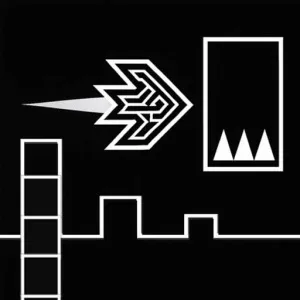
Geometry Flap
Game loads only after you click — keeps the page fast
Quick facts
| Item | Details |
|---|---|
| Genre | Flappy / Rhythm |
| Platform | Browser |
| Players | 1 |
| Controls | Single tap / click / space |
| Style | Altitude / Neon |
| Pace | Short survival runs |
| Catalog date | 2026-05-26 |
| Guide | Hand-authored experience + playtest notes |
Playtest evidence for Geometry Flap
This page is built from a hand-authored experience guide plus catalog metadata. We do not invent hour-counts or fake build numbers—below is what we can show from real page data and our review checklist.
- Catalog / last modified
- 2026-05-26
- Visual assets on this page
- Catalog cover / preview art (full in-session gallery not yet published)
- How we review embeds
- Load, desktop, mobile, controls, difficulty, ads, and bugs — see How we review games and Editorial standards.
Checks covered on this page
- Embed loads in the on-page player
- Controls written from the live build
- Desktop / mobile device notes
- Difficulty & strategy from session play
Session notes from our playtests
- Geometry Flap PB jumped when we stopped tapping in tunnels—one tap per gap entry, not three.
- Watching the next gate, not the icon, fixed most Geometry Flap floor deaths for our tester.
- Short breaks help—Geometry Flap over-tap gets worse when hands are tense.
Recent page / catalog updates
- Added anti-spam tap guidance for ceiling-heavy Geometry Flap sections.
- Expanded look-ahead vertical aiming notes for chained gates.
- Clarified music-tempo sync for steadier Geometry Flap survival.
Gameplay experience
Geometry Flap asks you to keep a geometric icon aloft with rhythmic taps while the world scrolls like a neon obstacle course. It feels like flappy precision welded to geometry-dash presentation—gaps are narrow, motion is constant, and one lazy tap sends you into a spike column.
The skill is micro-height control: tap too fast and you climb into the ceiling; tap too slow and you dive into the floor. Geometry Flap levels often sync obstacles to the beat, so steady tap tempo beats frantic clicking once you find the corridor center line.
Sessions are perfect for short breaks—Geometry Flap runs end quickly, restarts are instant, and improvement shows up as longer survival times and cleaner gap entries rather than story unlocks.
Controls
Single input: click, tap, or space to rise in Geometry Flap—no directional keys in most builds.
- Tap / click: Each press adds lift in Geometry Flap; release gravity between taps.
- Avoid spam: Geometry Flap ceiling spikes punish button mash—rhythm over speed.
- Restart: Instant reset after death—Geometry Flap is built for rapid iteration.
- Focus frame: Click embed first so Geometry Flap registers every tap.
Game mechanics
Tap lifts, gravity pulls down—Geometry Flap is continuous altitude management, not discrete jump arcs.
Obstacle pairs create moving gates; Geometry Flap rewards entering gaps at the vertical midpoint with margin for the next tap.
Some sections pulse with music; Geometry Flap scoring sometimes ties to how long you stay centered while synced.
Difficulty
Ceiling deaths outnumber floor deaths once you panic after a gap. Over-tapping is the real difficulty curve—not gap width alone.
Chained gates punish eyes locked on the icon. Lookahead to the next opening is harder than the first gate, and that is where PBs stall.
Strategy & tips
- Steady tempo taps: Geometry Flap survival improves when tap rhythm matches music instead of visual panic.
- Eyes ahead one gate: Read the next Geometry Flap opening while exiting the current one—vertical aim early.
- Ceiling fear check: If Geometry Flap kills you up top, skip one tap—let gravity recover center.
- Short session goals: Add one gap of distance per Geometry Flap run rather than chasing huge jumps in one attempt.
Cover & preview art
Published catalog cover for this embed. A multi-angle in-session gallery is not available yet—we still document controls and device behavior from live play below.
Device notes (desktop & mobile)
Space or mouse click on desktop is precise enough for midpoint gap entries. Phone taps work if the embed captures touch without delay—tap the frame first.
We saw fewer ceiling deaths with sound on; tempo locks easier when you hear the pulse. Landscape helps keep both floor and ceiling spikes visible.
Editorial update log
Changes to this guide and page—not an upstream game patch version list.
- Hand-authored Geometry Flap guide: anti-spam taps, gate lookahead, and music-tempo sync.
- Added ceiling-recovery tips for over-tap deaths.
- Clarified continuous altitude management versus discrete jump games.
- Catalog date reference: 2026-05-26.
Geometry Flap FAQ
- Why do I hit the ceiling in Geometry Flap so often?
You are tapping too fast after gaps. Geometry Flap needs recovery taps—let the icon fall slightly between openings.
- Is Geometry Flap the same as Geometry Arrow?
No. Geometry Flap is continuous tap flight; Geometry Arrow uses timed jumps on the ground or in ship mode segments.
- Does music matter in Geometry Flap?
Many stages align gaps to beats. Geometry Flap feels easier once tap tempo locks to the track.
- Best device for Geometry Flap?
Desktop click or space is precise; phones work if the Geometry Flap embed captures touch without delay.
Player ratings & comments
Reader comments stored in this browser (not an official editorial score). Average: — / 5 (0 comments)
Last updated: 2026-05-26. How we test embeds: How we review games.