Geometry Vibes 3D – Neon tunnel depth dodging
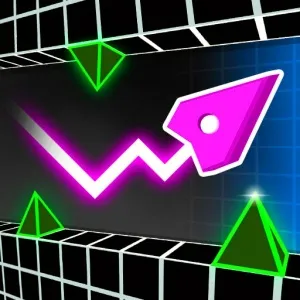
Geometry Vibes 3D
Game loads only after you click — keeps the page fast
Quick facts
| Item | Details |
|---|---|
| Genre | 3D Rhythm Runner |
| Platform | Browser |
| Players | 1 |
| Controls | Lane swap / arrows / swipe |
| Style | Tunnel / Bass sync |
| Pace | Hypnotic speed pulses |
| Catalog date | 2026-05-26 |
| Guide | Hand-authored experience + playtest notes |
Playtest evidence for Geometry Vibes 3D
This page is built from a hand-authored experience guide plus catalog metadata. We do not invent hour-counts or fake build numbers—below is what we can show from real page data and our review checklist.
- Catalog / last modified
- 2026-05-26
- Visual assets on this page
- Catalog cover / preview art (full in-session gallery not yet published)
- How we review embeds
- Load, desktop, mobile, controls, difficulty, ads, and bugs — see How we review games and Editorial standards.
Checks covered on this page
- Embed loads in the on-page player
- Controls written from the live build
- Desktop / mobile device notes
- Difficulty & strategy from session play
Session notes from our playtests
- Geometry Vibes 3D clicked after we stopped staring at the avatar—tunnel center line reads faster.
- Audio on for first clear only saved us twenty retries in Geometry Vibes 3D drop sections.
- Micro lane taps beat dramatic swerves every time in late Geometry Vibes 3D tubes.
Recent page / catalog updates
- Added depth-cue reading guide for early lane commits in Geometry Vibes 3D.
- Documented FPS stability tips for smoother Geometry Vibes 3D timing.
- Clarified audio-drop mapping for fork sections in Geometry Vibes 3D.
Gameplay experience
Geometry Vibes 3D drops you into rolling neon tunnels where hazards come from depth, not just left and right. The camera push makes speed feel physical—you are threading a shape forward while the world contracts around you, and the 'vibes' part is real: heavy bass lines and strobe color shifts sell each near miss.
Unlike flat dash clones, Geometry Vibes 3D asks you to read depth early. A barrier that looks far is often one beat away; lane swaps need to happen before the glow fills your windshield. Mastering Geometry Vibes 3D is learning to trust peripheral cues instead of staring at the icon.
Runs are hypnotic once timing clicks—Geometry Vibes 3D is for players who want rhythm game energy with a 3D roller-coaster skin, not a slow exploration title.
Controls
Arrow keys, A/D, or swipe lanes are common in Geometry Vibes 3D—check overlay on load.
- Lane move: Left/right input shifts position in Geometry Vibes 3D tunnels.
- Jump / lift (if any): Some Geometry Vibes 3D segments add vertical dodge—watch tutorial prompts.
- Pause: Use pause to recover eyes between long Geometry Vibes 3D streaks.
- Restart: Reset after studying which depth cue you misread in Geometry Vibes 3D.
Game mechanics
Depth-first telegraphs: glow intensity and shadow length hint time-to-impact in Geometry Vibes 3D—react when cues start, not when spikes fill the screen.
Lane or axis swaps sync to drops; Geometry Vibes 3D punishes lazy center-line riding when the track forks.
Speed pulses match music; Geometry Vibes 3D sections often require calmer inputs as velocity rises—panic swaps fail more than late reads.
Difficulty
Obstacles feel “instant” until you learn depth compression—glow that looks distant is one beat away. Late lane swaps are the usual wall.
Fork drops and speed pulses stack visual noise. The hard part is micro lane taps under strobe, not raw reaction speed.
Strategy & tips
- Read depth early: Geometry Vibes 3D kills come from late lane swaps—commit when glow appears small.
- Audio-first runs: Play one Geometry Vibes 3D stage with sound to map drops to dodge windows.
- Small corrections: Micro lane taps beat hard swings in Geometry Vibes 3D narrow tubes.
- FPS stability: Stutter breaks Geometry Vibes 3D timing—fullscreen embed if your browser allows.
Cover & preview art
Published catalog cover for this embed. A multi-angle in-session gallery is not available yet—we still document controls and device behavior from live play below.
Device notes (desktop & mobile)
Stable FPS matters more here than in flat runners—close tabs and try fullscreen so depth cues stay smooth. Arrow keys on desktop feel precise for micro lane taps.
Swipe lanes on phones work in landscape; portrait can hide fork telegraphs. Sound on for the first clear helps map bass drops to dodge windows.
Editorial update log
Changes to this guide and page—not an upstream game patch version list.
- Hand-authored Geometry Vibes 3D guide: depth-cue reading, micro lane taps, and FPS tips.
- Documented audio-drop mapping for fork sections.
- Clarified why obstacles feel instant until glow is read early.
- Catalog date reference: 2026-05-26.
Geometry Vibes 3D FAQ
- Why do obstacles feel instant in Geometry Vibes 3D?
Depth compresses distance. Geometry Vibes 3D wants early reads—move when glow starts, not when spikes look huge.
- Is Geometry Vibes 3D harder than flat geometry runners?
Different skill: Z-axis timing. Geometry Vibes 3D veterans often come from rhythm games, not platformers.
- Does Geometry Vibes 3D need a powerful PC?
Most browser builds run fine. Geometry Vibes 3D feels best with stable frame rate—close extra tabs.
- Relationship to Geometry Vibes Monster or X Ball?
Same vibes family, different gimmicks. Geometry Vibes 3D focuses on tunnel depth; siblings swap theme or ball control.
Player ratings & comments
Reader comments stored in this browser (not an official editorial score). Average: — / 5 (0 comments)
Last updated: 2026-05-26. How we test embeds: How we review games.