Geometry Vibes Monster – Creature telegraphs on beat
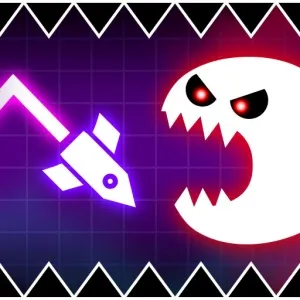
Geometry Vibes Monster
Game loads only after you click — keeps the page fast
Quick facts
| Item | Details |
|---|---|
| Genre | Rhythm Platformer |
| Platform | Browser |
| Players | 1 |
| Controls | Jump / lane swap |
| Style | Creature set-pieces |
| Pace | Loud scripted patterns |
| Catalog date | 2026-05-26 |
| Guide | Hand-authored experience + playtest notes |
Playtest evidence for Geometry Vibes Monster
This page is built from a hand-authored experience guide plus catalog metadata. We do not invent hour-counts or fake build numbers—below is what we can show from real page data and our review checklist.
- Catalog / last modified
- 2026-05-26
- Visual assets on this page
- Catalog cover / preview art (full in-session gallery not yet published)
- How we review embeds
- Load, desktop, mobile, controls, difficulty, ads, and bugs — see How we review games and Editorial standards.
Checks covered on this page
- Embed loads in the on-page player
- Controls written from the live build
- Desktop / mobile device notes
- Difficulty & strategy from session play
Session notes from our playtests
- Naming each Geometry Vibes Monster wind-up ('growl-beat-jump') fixed our repeat deaths faster than raw retries.
- We treat scream sections as rhythm-only—ignore extra particles in Geometry Vibes Monster finales.
- Geometry Vibes Monster pairs well with one Geometry Vibes 3D warm-up run to settle timing hands.
Recent page / catalog updates
- Added creature telegraph glossary for first-time Geometry Vibes Monster players.
- Expanded set-piece segmentation for dual-trick Geometry Vibes Monster finales.
- Clarified audio-stinger timing for jaw-trap Geometry Vibes Monster sections.
Gameplay experience
Geometry Vibes Monster keeps the pulse-sync backbone of the Vibes line but dresses stages in creature silhouettes, jaw-snapping gates, and exaggerated sound stingers. It is still a timing game first—monsters are readable hazards, not RPG battles—but the personality is louder than sterile neon tunnels.
Geometry Vibes Monster levels love telegraphing through animation: a monster winds up on beat, then the safe window opens for exactly one jump. Treat those wind-ups like rhythm chart notes and the chaos becomes fair.
If Geometry Vibes 3D felt abstract, Geometry Vibes Monster adds character flavor without changing the core contract—memorize patterns, execute on beat, restart fast when a jaw closes on you.
Controls
Jump or lane inputs match other Vibes titles—confirm Geometry Vibes Monster tutorial icons at stage start.
- Jump / click: Primary Geometry Vibes Monster input on cube-style sections.
- Lane swap: Some Geometry Vibes Monster rooms use left/right dodges instead of vertical jumps.
- Restart: Fast reset—Geometry Vibes Monster expects repetition until wind-ups feel automatic.
- Focus embed: Click player frame so Geometry Vibes Monster captures input during loud visual flashes.
Game mechanics
Animated telegraphs replace some static spikes—watch creature wind-ups in Geometry Vibes Monster, not only ground tiles.
Audio stingers often mark jump windows; Geometry Vibes Monster sync is easier when you play with sound once per stage.
Set-piece screens combine two tricks; Geometry Vibes Monster expects segment practice like other hard rhythm platformers.
Difficulty
Visual noise is the fake difficulty—patterns are scripted. Players who react to particles instead of wind-up beats die on fair windows.
Finale set-pieces stack two tricks without a rest tile. Segment each half solo before chaining; raw retries feel crueler than they are.
Strategy & tips
- Learn wind-up tells: Each Geometry Vibes Monster creature has a repeat telegraph—die once, name the beat, clear next run.
- Sound on first try: Geometry Vibes Monster stingers align to safe frames—mute after you know the map if you prefer.
- Segment set-pieces: Split Geometry Vibes Monster finale rooms into two tricks—combine only after each half is solo-clear.
- Stay calm on scream sections: Geometry Vibes Monster visual noise spikes but patterns stay stable—trust the rhythm.
- Jaw-trap timing: Jump on the beat after the wind-up ends, not when the mouth opens—windows are short.
Cover & preview art
Published catalog cover for this embed. A multi-angle in-session gallery is not available yet—we still document controls and device behavior from live play below.
Device notes (desktop & mobile)
Loud flashes can steal focus—click the embed before scream sections so jumps still register. Desktop click or space stays reliable under particle spam.
Phones handle shorter rooms; long finales benefit from headphones so stingers cut through visual noise. Landscape keeps jaw telegraphs fully on-screen.
Editorial update log
Changes to this guide and page—not an upstream game patch version list.
- Hand-authored Geometry Vibes Monster guide: creature telegraphs, stinger timing, and set-piece segmentation.
- Added jaw-trap beat notes for short safe windows.
- Clarified that monster patterns are scripted, not random.
- Catalog date reference: 2026-05-26.
Geometry Vibes Monster FAQ
- Are monsters random in Geometry Vibes Monster?
No—animations are scripted. Geometry Vibes Monster patterns repeat; learn wind-ups instead of reacting randomly.
- Do I need Geometry Vibes 3D first?
Helpful but not required. Geometry Vibes Monster shares sync ideas; theme and set-pieces differ.
- Why does Geometry Vibes Monster feel louder visually?
Creature set-pieces flash more. Geometry Vibes Monster timing is still beat-stable—audio helps filter noise.
- Best tip for jaw-trap sections in Geometry Vibes Monster?
Jump on the beat after the wind-up ends, not when the mouth opens—Geometry Vibes Monster windows are short.
Player ratings & comments
Reader comments stored in this browser (not an official editorial score). Average: — / 5 (0 comments)
Last updated: 2026-05-26. How we test embeds: How we review games.